
Shopify Hero Banner Template
A template for creating first-screen visuals that combine product identity, campaign atmosphere, and concise selling points.
VisualNovi Editorial Team · Reviewed by Commerce Strategy Team · Updated Sep 16, 2026
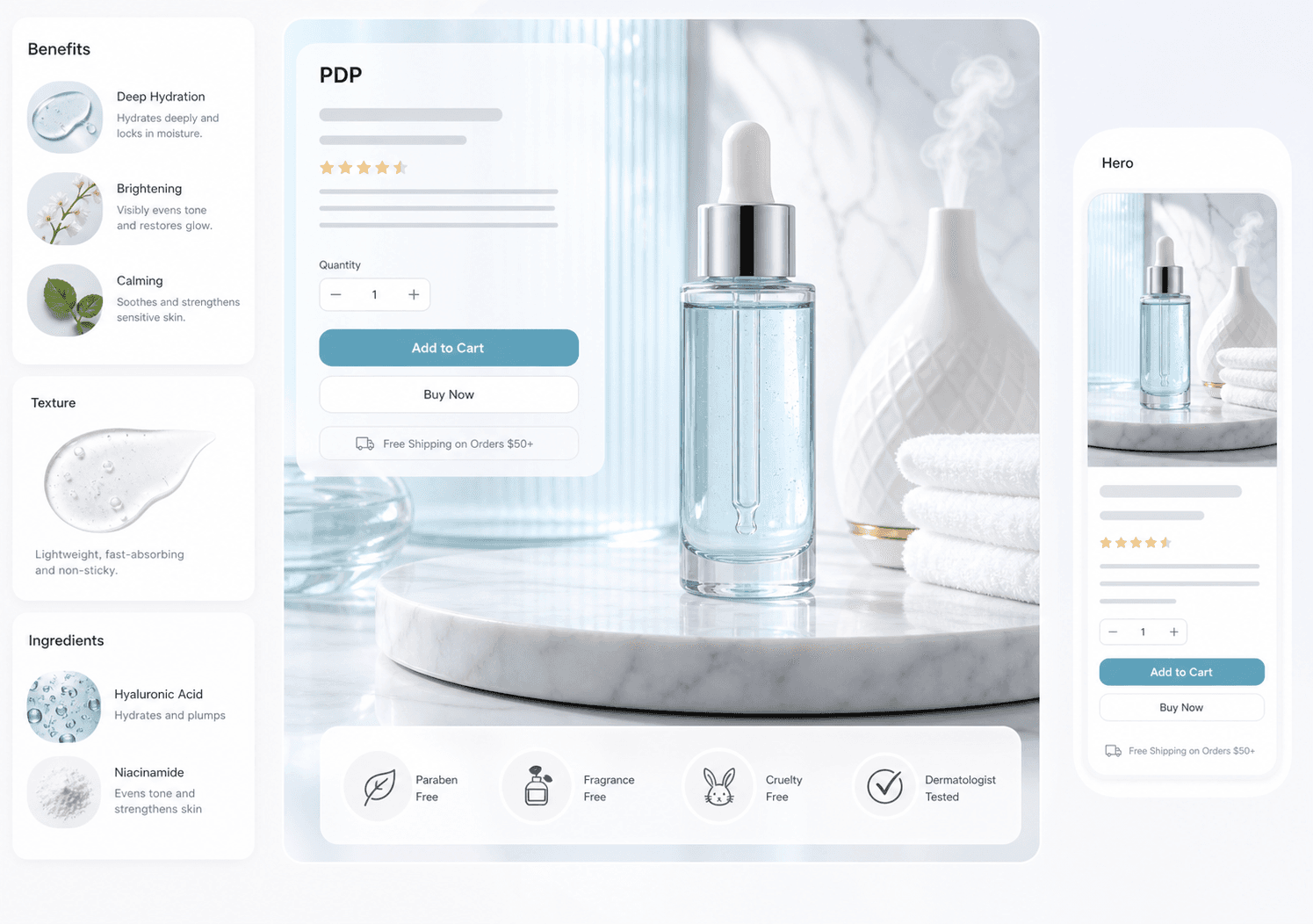
Shopify Hero Image and Banner Template
Workflow Overview
Choose the right next step
Workflow focus
Shopify hero image template
Best fit
E-commerce teams evaluating a product-image workflow
Start the workflow
Start generatingTemplate direction
Create a polished storefront hero image for a DTC product page, with strong product focus and a clear campaign mood.
Best settings
Use 16:9 or 4:3 for desktop hero layouts and 4:5 or 9:16 when repurposing for mobile campaigns.
What a Shopify hero banner has to carry
A storefront hero has about one second to place the product and set the campaign mood. The failure modes are consistent: a scene so busy that the product is lost, or a product cutout with no context at all. Keep the product occupying a deliberate part of the frame, leave a clear zone for the headline, and check the mobile crop before publishing, because the desktop composition is not what most visitors see.
Turning one hero into a full campaign set
A single hero rarely fits the homepage, a collection header, an email header and a paid social placement. Build from the widest master composition and derive the crops, keeping the product in the same relative position so the set reads as one campaign. When the campaign changes, update the master first and re-derive, which keeps the placements from drifting apart.
FAQ
What is Shopify Hero Banner Template?
Shopify Hero Banner Template is a VisualNovi resource for e-commerce sellers who want clearer product visuals and practical AI image workflows.
Can I use this workflow for commercial e-commerce pages?
Yes, but every AI-generated image should be reviewed for product accuracy, text accuracy, brand compliance, and marketplace rules before publishing.
What size should a Shopify hero banner be?
Shopify serves banners responsively, so build a wide master and derive the mobile crop from it. The practical check is whether the product and headline still read on a phone, not the pixel width of the desktop file.
Can a hero banner carry promotional text?
Yes. Unlike marketplace lead images, a storefront hero can carry copy, but keep one message, make sure the offer matches the landing page, and leave the text room to breathe in the mobile crop.
Ready to apply this workflow?
Create the next product visual
Use the Shopify hero image template workflow with your product references, then review the result against the destination channel before publishing.
Related resources
Ecommerce Hero Banner Generator
Generate ecommerce hero banners for collection launches, DTC landing pages, seasonal campaigns, paid traffic, and product storytelling.
Amazon Main Image Requirements 2026
Use a practical Amazon main-image checklist to prepare a product-first image, clean its background, and review the final asset before upload.
Shopify PDP Image Generator
Build Shopify PDP image sets for hero, benefits, use cases, trust, and mobile galleries, with a conversion-focused order for each SKU.
Amazon Listing Image Requirements 2026
See how an Amazon listing image generator can help sellers create main-image directions, lifestyle scenes, feature callouts, and benefit visuals faster.
Resource center
A central entry point for guides, examples, templates, industry pages, and channel hubs.
AI product image resources
Browse guides, comparisons, templates, examples, and production use cases.
AI product image software resources
Cover software evaluation, creative automation, PDP optimization, and ecommerce buying intent.
Amazon and Shopify image resources
See how marketplace and storefront image systems differ.
Ecommerce localization resources for global sellers
A practical planning hub for teams adapting one approved SKU into market-aware creative for North America, Europe, Japan, South Korea, Hong Kong, and Taiwan without losing product accuracy or platform context.
E-commerce video
Alongside product-image workflows, VisualNovi supports e-commerce video generation from a product start image and a short creative direction. It helps teams explore product motion for PDP heroes, short-form ads, and social previews, while keeping task history in the same account workspace. Teams must review every result for product accuracy and channel compliance before publishing.
Industry pages
Explore category-specific workflows for beauty, electronics, home, pet, and more.
Examples
Inspect public examples for detail pages, hero visuals, and marketplace sets.
Templates
Use reusable prompt and workflow templates for production tasks.